
Point at Any URL
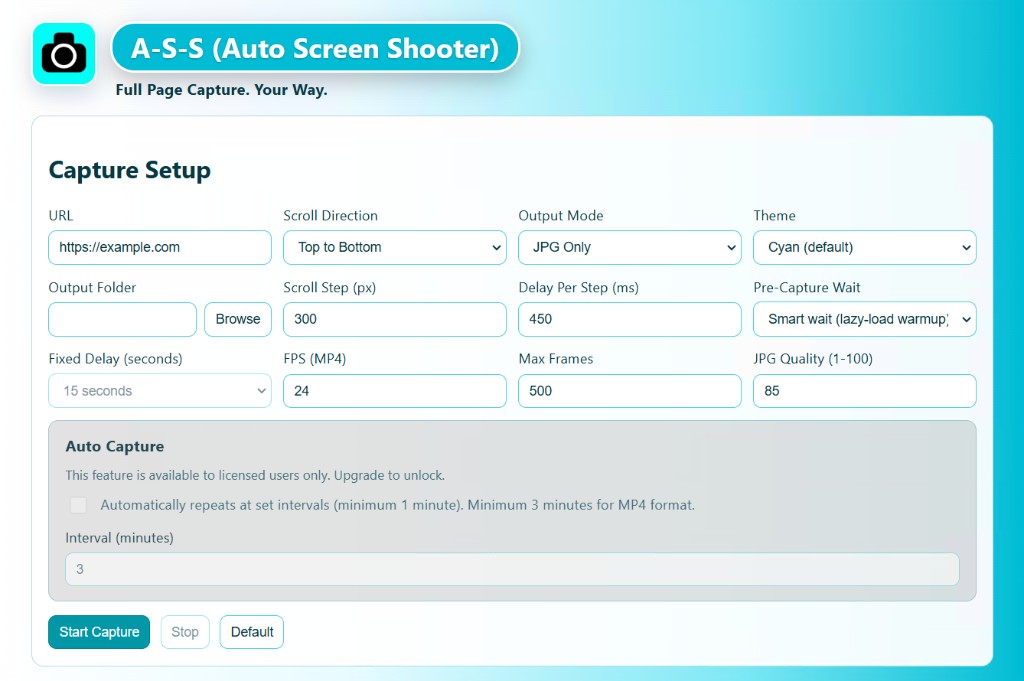
Navigate to any website in the world — your own, a client’s, a competitor’s. A·S·S is non-judgmental and very thorough.
Grab the Windows app, the macOS app, or the Chrome extension and start shooting full pages today—no credit card, no trial clock. When you are ready for watermark-free exports and the rest of the pro toolkit, licenses start at $29.99 for two seats.
$29.99
Most popular license · 2 seats
No subscriptions—ever. One-time purchase, free upgrades for life, 30-day refund if it is not a fit.
Why Auto Screen Shooter
Auto Screen Shooter scrolls, stitches, and archives entire webpages so nothing gets cropped away. The desktop apps for Windows and macOS export JPG, PDF, and MP4 in the current release. The Chrome extension is built for the tab you are already in and exports PNG and PDF.
Download either stack for free, keep it as long as you like, and upgrade only if you want the licensed experience. Paid plans cover two seats by default—think two active installs split however you want between desktops and the extension.
Yes, we still call it A·S·S—and yes, it earns the name every capture. 📸
Pricing
Use the free builds to prove the workflow. When you are ready to remove watermarks, unlock automation, and support ongoing development, pick the seat pack that matches your studio. Every license is a single charge—no sneaky renewals—and includes free upgrades for the life of the product.
$29.99
2 seats · mix desktop + Chrome freely
Two concurrent activations across Windows, macOS, and the Chrome extension—assign them however your team actually works.
Buy 2 seats via StripeSecure checkout · 30-day refund
| Seats | Price (USD) | |
|---|---|---|
| 5 seats | $64.95 | Checkout |
| 10 seats | $99.99 | Checkout |
| 100 seats | $799.00 | Checkout |
| 500 seats | $3,495.00 | Checkout |
Questions before you buy? Download the free build and explore the capture flow first.
Three simple steps
No complicated setup. No learning curve. Just point, shoot, and walk away with a perfect capture.
Navigate to any website in the world — your own, a client’s, a competitor’s. A·S·S is non-judgmental and very thorough.
On desktop pick JPG, PDF, or MP4; in Chrome pick PNG or PDF. Hit shoot and A·S·S scrolls, stitches, and packages the entire page—top to bottom, no missing slices.
Clean. Full-length. Beautiful. No clipping, no half-loaded junk. Just a gorgeous shot ready to share, archive, or present.
What makes A·S·S so good
Desktop and Chrome both ship polished, scrollable PDFs—ideal for approvals, archives, and anything that needs to look exactly like the live page.
Windows and macOS can record silky full-page walkthroughs as MP4—perfect for walkthroughs, stakeholder reviews, and social-ready clips without a separate editor.
Dial in scroll cadence, tune JPG quality, and lean on smart loading so lazy sites still finish tall. This is the control room for power users.
Stay inside the tab you are auditing: current view, stitched full page, or desktop picker flows—plus optional auto-capture, site rules, and filename templates.
Download the desktop installers and the extension build, run real captures, and upgrade only when you need the licensed export stack.
Raster output follows the platform: desktop saves adjustable JPG plus MP4, while the extension focuses on lossless PNG alongside PDF.


Desktop & API tech specs → Download builds → Chrome Web Store →
Where A·S·S runs
 Windows — Desktop app: JPG, PDF, and MP4 (current release).
 macOS — Desktop app: JPG, PDF, and MP4 (current release).
 Chrome extension — PNG and PDF from the active tab, optional scheduling, site rules, and more. Install from the Chrome Web Store.
Licenses stay yours with free upgrades for life—no subscription math, no surprise invoices. 30-day money-back guarantee. If A·S·S does not feel indispensable, tell us and we will make it right.
Use cases
Pick a lane that sounds like you, tap the card, and skim the playbook—designers, sellers, marketers, and teams all use the same capture engine in different ways.
Every web designer knows the pain: a client wants a full-page screenshot and you spend 20 minutes stitching browser captures in Photoshop. A·S·S ends that entirely. One click delivers a pixel-perfect, full-length PDF or JPG — no cropping, no seams.
Use it to build your portfolio, deliver client sign-off proofs, document responsive breakpoints, or archive versions before a launch. MP4 mode even lets you record a smooth scroll-through.
The best marketing research happens fast — a competitor’s landing page, a limited-time offer, a campaign live for 48 hours. A·S·S captures any page instantly — full length, in PDF or JPG, before it’s gone.
Build a swipe file of high-converting pages. Document A/B test variants before and after. Record scroll-through MP4s of full funnels to share with your team.
Marketer’s move: Shoot a full-page PDF of every landing page you launch at go-live. Six months later you’ll thank yourself when analyzing what changed.
Taking screenshots of every mockup, every color variant, every listing across Printful or Printify is a never-ending chore. A·S·S captures your full product pages — including all scrolled content — in one clean PDF or JPG.
Use full-page screenshots as catalog pages for wholesale pitches or PDF lookbooks. MP4 scroll recordings of your best listings make strong Instagram and TikTok content.
POD seller trick: Shoot your top 20 listings as full-page JPGs monthly. Track how your store evolves and reuse the visuals in marketing without reloading the mockup tool.
A tiny cropped screenshot of a product page doesn’t build confidence. A·S·S captures the entire page — pricing, reviews, description, images, everything — in one polished PNG or PDF from Chrome, or JPG/PDF/MP4 from desktop.
Use full-page shots in link-in-bio pages, newsletters, or press kits. On desktop, record MP4 scroll-throughs of affiliate products for Stories—authentic, informative, and zero timeline scrubbing.
Creator tip: Screenshot your own published content pages right after posting. Build an archive for sponsorship pitches — full page, not just a phone snap.
Scrolling manually, cropping awkwardly, stitching in Photoshop — capturing your Etsy shop properly has always been a pain. A·S·S captures every listing page, your full shop front, and your entire catalog in seconds.
Use full-page PDFs of your best listings in pitch decks for boutique stockists. Screenshot your shop homepage before and after seasonal refreshes. Record MP4 scroll-throughs of your top listings for social.
Etsy seller tip: Shoot a full-page PDF of every listing when you first publish. You’ll have a complete catalog archive to share with wholesale buyers — no mockup tool needed.
A growing Shopify store means hundreds of product pages that need to be documented, shared, and showcased. Shoot the URLs you care about — each product page, homepage, or collection saves as a full-length PDF or JPG on desktop (PNG/PDF inside Chrome), stitched top to bottom every time.
Use captures in pitch decks for retail partnerships, email newsletters showcasing new arrivals, and internal team reviews. MP4 recordings of your best collection pages are ready-made video ads — shot in 30 seconds.
Shopify tip: Shoot your homepage before every major update. Build a visual changelog your whole team can reference.
On launch day your store looks perfect. Capture it — every product page, homepage, collection — as full-page PDFs. Your store’s best day, preserved forever.
Record a smooth MP4 scroll of your best product page. Add music. Post as a video ad. No video production budget needed. A·S·S does the heavy lifting.
Tap + on a card to expand · mix and match workflows across desktop & Chrome
Don’t wait. Shoot now.
Desktop apps: JPG, PDF, and MP4. Chrome extension: PNG and PDF. Any public site you can reach. Download free, upgrade when you are ready, and keep every future release on the house.